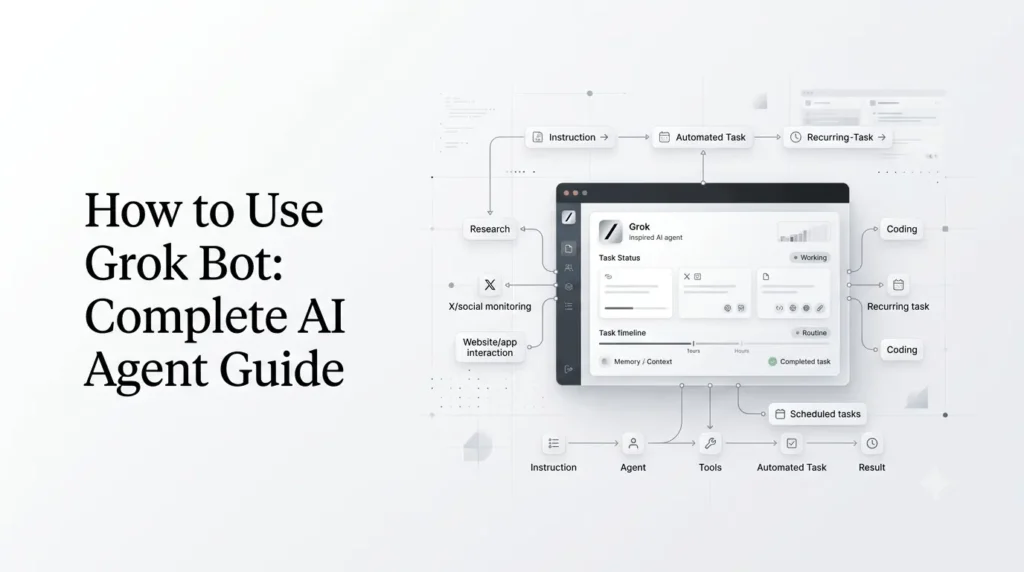
Grok Bot is SpaceXAI’s persistent AI-agent system for delegating real work to AI teammates that can operate independently across websites, apps, inboxes, and other tools. Unlike a normal Grok conversation that waits for your next prompt, a Grok Bot can keep working after you step away, remember how you prefer tasks to be done, and return when it finishes or needs your approval.
This makes How to Use Grok Bot a different question from simply asking how to use Grok. Grok Bot is designed around persistent agents, routines, tools, memory, and ongoing responsibilities rather than one-off answers.
In this guide, you’ll learn what Grok Bot is, how persistent AI agents work, how to create your first Bot, how to teach it a workflow, how to use Routines and Skills, how to connect it to X, and practical use cases for marketing, research, sales, development, operations, and personal productivity.
What Is Grok Bot?
Grok Bot is a system of persistent AI agents that can be given a specific job and allowed to execute that work autonomously. Each Bot has its own identity, memory, computer environment, and tools, allowing it to continue working beyond a single chat session.
The simplest way to understand the difference is:
Regular AI chatbot:
You ask → AI responds → conversation stops.
Grok Bot:
You assign a job → Bot works → Bot remembers the workflow → Bot continues working → Bot asks for approval when necessary.
A Bot can interact with websites and applications much like a person using a computer. SpaceXAI says Bots can work with services that don’t have a clean API or MCP integration because they have their own computer in the cloud.
Grok Bot vs regular Grok
| Capability | Regular Grok | Grok Bot |
|---|---|---|
| Answer questions | Yes | Yes |
| Multi-step tasks | Yes | Yes |
| Persistent identity | No | Yes |
| Own computer | No | Yes |
| Work while you’re away | Limited | Yes |
| Remember workflows | Via features such as Skills | Yes |
| Learn from demonstrations | Limited | Yes |
| Work across apps | Through available integrations | Yes |
| Run recurring work | Automations | Routines |
| Coordinate with other agents | Limited | Yes |
| Human approval | User-controlled conversation | Bot can pause for decisions |
The important distinction is that Grok Bot is designed to have responsibility for a job, not merely provide an answer.
How Do Persistent AI Agents Work?
A persistent agent needs more than a language model.
SpaceXAI describes Grok Bot around five core concepts:
- Bots — persistent agents with their own identity, memory, runtime, and tools.
- Chats — conversations used to work with a Bot.
- Prompts — instructions given to the Bot.
- Tools — software, APIs, connectors, shell access, and computer interaction.
- Artifacts — durable outputs such as documents, code, designs, and data.
This architecture changes how you should think about prompting.
Instead of creating a giant prompt every morning explaining how you want a task performed, you can create a Bot for that responsibility, teach it your workflow, correct it when necessary, and let it repeat the process.
A simple example
Suppose you publish an AI news website.
Instead of asking Grok every morning:
Find the latest AI news, identify the five most important stories, summarize them, and prepare a briefing.
You could create a News Research Bot.
You teach it:
- Which sources to monitor
- What topics matter
- How to rank stories
- What sources to avoid
- Your preferred briefing format
- When to ask for approval
- Where the final report should be placed
The Bot can then take responsibility for the recurring workflow.
That is the core idea behind persistent AI agents.
How to Use Grok Bot?
The basic process is straightforward:
- Get an eligible Grok Bot plan.
- Install the Grok Bot application.
- Create a Bot.
- Give it a clearly defined role.
- Connect the tools it needs.
- Give it a real task.
- Watch how it works.
- Correct it when necessary.
- Turn successful workflows into repeatable routines.
- Review its output and approval requests.
SpaceXAI’s current documentation lists eligible plans including SuperGrok Plus, SuperGrok Heavy, Cursor Pro+, Cursor Ultra, and Cursor Teams Standard or Premium. Grok Bot is also available on mobile, while the desktop app supports macOS, Windows, and Linux.
Step 1: Install Grok Bot
Start by installing the Grok Bot desktop application for your operating system.
SpaceXAI currently provides desktop support for:
- macOS
- Windows
- Linux
Mobile access is also supported.
After signing in, you’ll be able to create your first Bot.
Step 2: Create Your First Bot
Don’t start by creating a Bot called something vague like “My Assistant.”
Give the Bot a specific responsibility.
Better examples include:
- SEO Research Bot
- Content Research Bot
- Social Media Bot
- Lead Research Bot
- Customer Support Bot
- WordPress Monitoring Bot
- Competitor Analysis Bot
- Coding Review Bot
- Procurement Bot
- Daily News Bot
A focused role makes it easier to decide which tools the Bot needs and what it should be allowed to do.
Example Bot instruction
You could create a research Bot with an instruction like:
You are my AI research assistant. Monitor developments in AI image generators, AI video models, LLMs, and major AI products. Prioritize official announcements and primary sources. Prepare concise research briefs and clearly separate confirmed information from unverified claims. Never publish anything without my approval.
The instruction defines the Bot’s responsibility without requiring you to micromanage every individual task.
Step 3: Give the Bot Access to Its Tools
A persistent agent is only useful if it has access to the systems required for its job.
Depending on your workflow, that could include:
- Websites
- Google Workspace
- Slack
- GitHub
- CRM systems
- X
- Documents
- Spreadsheets
- Internal applications
- APIs
- Other connected services
Grok Bot’s computer-use model allows it to interact with websites and applications even when those services don’t provide a clean API or MCP integration.
Give the minimum access required
This is one of the most important practical rules.
If a Bot only needs to read information, don’t automatically give it permission to send emails, delete records, publish content, or make purchases.
A useful principle is:
Read first → draft second → act last.
Start with observation and drafting. Give the Bot permission to perform irreversible actions only after you’ve established that its workflow is reliable.
Step 4: Give the Bot a Real Task
Your first task should be meaningful but relatively easy to verify.
For example:
Review the latest AI product announcements from the sources I’ve connected. Create a list of the five most important developments, explain why each matters, and include the source for every claim. Do not publish or send anything.
This lets you evaluate:
- Research quality
- Source selection
- Reasoning
- Formatting
- Tool usage
- Accuracy
- Whether the Bot understands your preferences
Don’t begin with a task that could cause significant damage if the Bot misunderstands you.
Step 5: Let Grok Bot Work
One of the biggest differences between Grok Bot and ordinary chat is that you don’t have to remain in the conversation waiting for every step.
SpaceXAI describes Bots as having their own cloud computer and being able to continue working while you’re away.
The Bot can work through the task and return when:
- The job is finished
- It needs clarification
- It reaches an approval point
- It encounters a problem
- It needs additional access
This is what makes Grok Bot a persistent agent rather than simply another chatbot interface.
How to Teach Grok Bot Your Workflow?
One of Grok Bot’s most interesting capabilities is that you can teach it by showing it how you perform a task.
SpaceXAI says the Bot can follow along while you perform a workflow, save the routine, incorporate your corrections, and run the process independently the next time.
This is particularly useful for repetitive work.
Example: teaching an SEO workflow
Imagine your normal process is:
- Find a target keyword.
- Review competing pages.
- Identify search intent.
- Build an outline.
- Research primary sources.
- Draft the article.
- Check headings.
- Create SEO metadata.
- Prepare the article for WordPress.
Instead of describing every step in a prompt, you can demonstrate the workflow.
The Bot can then learn the pattern and reuse it.
Why demonstrations can work better than instructions?
Written instructions describe what you want.
A demonstration can show:
- Which website you open
- Which buttons you click
- Which information matters
- What you ignore
- How you structure the output
- Where you save the result
- When you stop and ask for approval
That makes workflow teaching particularly useful for operational tasks.
What Are Grok Bot Routines?
Routines are one of the most important concepts for persistent agents.
A Routine is a standing responsibility that can activate automatically according to a schedule or an event.
SpaceXAI describes Routines as a way to make work start without requiring the user to send a prompt every time.
For example:
- Every weekday at 8:00 AM
- Every Monday at 9:00 AM
- Every month on the first day
- Every 30 minutes
- When a specific event occurs
- When a particular message or issue appears
This means your Bot can move from:
"Do this for me."
to:
"Keep an eye on this responsibility."
Grok Bot Routine Examples
Daily AI news briefing
Set a routine for 8:00 AM:
Review the latest AI developments and prepare a briefing covering important model launches, major product updates, AI industry news, and significant company announcements. Prioritize primary sources. Flag stories that may require further research.
Weekly competitor monitoring
Every Monday, review the websites and public announcements of these competitors. Identify new products, pricing changes, feature launches, and major content updates. Prepare a comparison report.
Website monitoring
Check the website every morning for major errors, broken pages, unusual changes, or important alerts. Report anything that requires human attention.
The exact capabilities available to a Bot depend on its connected tools and permissions.
Grok Bot Automations vs Routines
It’s important not to confuse Grok Automations with Grok Bot’s persistent-agent Routines.
Grok introduced Automations in July 2026 as scheduled or event-triggered jobs that run from Grok. An automation can use instructions, attached files, connectors, and Skills, then create a fresh conversation for each run.
Grok Bot’s Routines are part of the persistent-agent model.
A useful distinction is:
| Feature | Automations | Grok Bot Routines |
|---|---|---|
| Primary purpose | Scheduled/event-triggered Grok jobs | Persistent Bot responsibilities |
| Persistent agent identity | Not the central concept | Yes |
| Scheduled execution | Yes | Yes |
| Event triggers | Yes | Yes |
| Bot memory | Not the core model | Central to Bot |
| Own computer | No | Yes |
| Multi-Bot coordination | No | Yes |
| Best for | Repeatable Grok tasks | Ongoing delegated work |
Automations remain useful for straightforward recurring tasks. Grok Bot is designed for deeper, persistent responsibilities.
What Are Grok Skills?
Skills allow Grok to retain specialized expertise and workflow instructions across conversations.
SpaceXAI introduced Skills in May 2026 as a way to teach Grok something once and reuse that expertise. Built-in Skills include document, presentation, spreadsheet, PDF, and Skill Creator capabilities.
For a Grok Bot workflow, Skills can provide reusable knowledge about how a particular type of task should be handled.
For example, a content operation might have a Skill describing:
- Brand style
- Formatting requirements
- SEO rules
- Internal linking conventions
- Metadata requirements
- Editorial standards
This reduces the need to repeat the same background instructions.
Skills vs Routines
Think about them this way:
Skill = how the work should be done.
Routine = when the work should happen.
For example:
Skill: “How to prepare our weekly SEO report.”
Routine: “Run the SEO report every Monday at 9 AM.”
That distinction makes persistent-agent systems easier to design.
How to Use Grok Bot With X?
Grok Bot received tighter X integration on August 29, 2026.
You can connect your X account and ask a Bot to:
- Search posts
- Read your timeline
- Check mentions
- Research what’s happening on X
- Pull trends
- Manage bookmarks
SpaceXAI also provides an X plugin for these capabilities. Paid Grok Bot users receive free X API credits to get started with the integration.
Example: X monitoring Bot
You could create a Bot with a responsibility such as:
Monitor X for significant announcements about AI image generators, LLM releases, and major AI product updates. Separate official company announcements from user speculation. Create a morning report with links and highlight anything that could become an article topic.
This is a much more useful application than simply asking Grok:
“What’s trending on AI today?”
The Bot can be given an ongoing responsibility instead of answering one question.
Grok Bot Use Cases
The best Grok Bot use cases are tasks that are:
- Repetitive
- Multi-step
- Time-consuming
- Digital
- Easy to review
- Based on clear rules
- Connected to tools the Bot can access
Here are some of the most practical applications.
1. AI News Research
Create a research Bot that continuously monitors:
- AI model releases
- Company announcements
- Product updates
- Pricing changes
- Research developments
- Industry news
- X discussions
The Bot can prepare a briefing while you focus on writing.
2. SEO Research
An SEO Bot could:
- Research target topics
- Analyze competing content
- Identify related questions
- Collect primary sources
- Build content briefs
- Suggest internal links
- Monitor competitor developments
Human editorial review should remain part of the workflow, particularly for factual claims and strategic decisions.
3. Content Operations
A content Bot could manage repetitive editorial tasks such as:
- Preparing briefs
- Organizing research
- Formatting drafts
- Creating metadata
- Checking article requirements
- Preparing publishing checklists
The goal isn’t necessarily to automate writing completely. It can be more valuable to automate the work surrounding writing.
4. Social Media Monitoring
With X integration, a Bot can monitor mentions, relevant posts, trends, and conversations.
A marketing team could use it to create a morning social intelligence report.
For example:
Identify the most important conversations about our brand and three competitors from the previous 24 hours. Summarize sentiment, identify recurring complaints, and flag posts requiring a response. Do not reply automatically.
5. Sales Research
A sales Bot can help with:
- Account research
- Prospect research
- CRM updates
- Call-note processing
- Follow-up drafts
- Lead qualification
SpaceXAI says internal teams have used Bots for sales outbound, CRM updates, and follow-up preparation.
6. Marketing Operations
A marketing Bot could coordinate repetitive tasks across:
- CRM
- Analytics
- Social platforms
- Project-management systems
- Research tools
For example, after a webinar it could collect relevant information, identify follow-up opportunities, and prepare drafts for human approval.
7. Customer Support
A support Bot could:
- Monitor incoming requests
- Categorize issues
- Research known solutions
- Draft responses
- Update tickets
- Escalate unusual cases
For customer-facing work, keep human approval in the loop until the Bot demonstrates consistent accuracy.
8. Software Development
Engineering teams can use Bots to monitor:
- Pull requests
- Bugs
- Build failures
- Security findings
- Merge conflicts
- Documentation tasks
SpaceXAI says its own engineering teams use Bots for bug reproduction, ticket filing, and debugging workflows.
Grok’s broader agentic coding ecosystem also includes Grok Build and /goal, which can execute long-running implementation tasks.
9. Research Assistant
A research Bot can continuously investigate a specific subject and build a knowledge base over time.
Good examples include:
- Competitor intelligence
- Technology monitoring
- Industry research
- Regulatory monitoring
- Market research
- Academic research
The key is to define the Bot’s source hierarchy and require citations.
10. Procurement and Cost Optimization
Procurement is a particularly interesting persistent-agent use case.
SpaceXAI says an internal procurement Bot analyzed vendor spend, contracts, usage data, market pricing, and competitive quotes and identified more than $100,000 in direct savings. The company describes this as an example of a Bot continuously working within a defined role.
This illustrates a broader principle:
Persistent agents are most valuable when useful signals appear gradually over time.
A one-off prompt may not notice a pattern in vendor usage. A Bot responsible for monitoring the situation can.
How to Build a Good Grok Bot?
The quality of a persistent agent depends heavily on how you define its job.
1. Give it one clear responsibility
Bad:
You are my general assistant. Do everything.
Better:
You monitor AI industry developments and prepare a daily research briefing.
2. Define what success means
Tell the Bot what a successful result looks like.
For example:
Every report must contain five developments, a short explanation, primary-source links, and a section called “Potential Article Ideas.”
3. Define what requires approval
This is critical.
Specify actions the Bot can perform independently and actions that require you.
For example:
Allowed without approval:
- Read research
- Analyze documents
- Prepare drafts
- Organize information
Approval required:
- Publish content
- Send external emails
- Delete data
- Purchase anything
- Change production systems
4. Define source preferences
For research work:
Prefer official company announcements, documentation, research papers, government sources, and primary datasets. Use secondary sources for context, not as the only evidence for important claims.
5. Start with observation
Before giving a Bot permission to act, let it observe and report.
This makes mistakes easier to identify.
6. Review and correct
If the Bot repeatedly makes the same mistake, correct the workflow rather than manually fixing every individual output.
That is where persistent agents become more valuable over time.
Grok Bot Group Chats and Multiple Agents
Grok Bot isn’t limited to a single agent.
SpaceXAI says Bots can message one another and share context. They can also participate in group chats where they coordinate work and involve the user when judgment is required.
This enables a multi-agent workflow.
For example:
Research Bot → Writer Bot → Editor Bot
The Research Bot gathers evidence.
The Writer Bot turns the research into a draft.
The Editor Bot checks:
- Accuracy
- Structure
- Clarity
- Formatting
- Missing information
The human then approves the final result.
This approach can be more effective than creating one enormous Bot that tries to perform every role.
Grok Bot for Developers
Developers can use Grok Bot for more than code generation.
Potential workflows include:
- Monitoring repositories
- Reviewing pull requests
- Investigating bugs
- Reproducing issues
- Preparing tickets
- Checking builds
- Reviewing documentation
- Running repetitive development tasks
For highly autonomous coding, Grok Build provides a separate agentic environment. Its /goal mode lets developers assign a long-running objective and allows the agent to plan, execute, verify, pause, and resume the work.
Grok Build also supports workflows that split complex tasks among many parallel agents and verify results before producing a final report.
So developers should think of the ecosystem as having different levels:
- Grok → conversational AI
- Grok Bot → persistent workplace agents
- Grok Build → agentic software development
- Workflows → parallel multi-agent execution
Is Grok Bot Free?
Grok Bot is not simply an unlimited feature of the basic free Grok experience.
At launch, SpaceXAI made Grok Bot available to selected paid Grok and Cursor subscribers, and the eligible plan list has expanded. Current documentation lists SuperGr
ok Plus, SuperGrok Heavy, Cursor Pro+, Cursor Ultra, and Cursor Teams Standard or Premium.
On August 26, SpaceXAI announced that Grok Bot was included with more plans, including SuperGrok and additional Cursor plans.
Enterprise availability was announced on September 3, 2026, with access, network, and audit controls for organizations.
Because Grok Bot is still evolving, check the current plan and availability information before subscribing specifically for Bot access.
Grok Bot Privacy and Security Considerations
Persistent agents create a different security challenge from ordinary chatbots because they can potentially access real applications and take real actions.
SpaceXAI says each user’s work runs in an isolated environment and that a Bot has no access by default; it can only reach accounts the user signs it into.
Even with those controls, users should follow basic agent-security principles.
Don’t give unnecessary permissions
If a Bot doesn't need access to your financial account, don't connect it.
Avoid unrestricted destructive actions
Be particularly cautious with:
- Deleting files
- Sending external messages
- Publishing content
- Making purchases
- Modifying production systems
- Changing account settings
Keep approval gates
For important actions, configure your workflow so the Bot prepares the action but asks you to approve it.
Audit recurring work
Don’t assume that a Bot that worked correctly last month will always behave correctly.
Review its runs periodically.
Grok Bot Limitations
Grok Bot is powerful, but persistent autonomy introduces limitations that don’t matter as much in ordinary chat.
It can make incorrect decisions
An agent can misunderstand instructions, misinterpret information, or select an inappropriate action.
Tool access increases the consequences of mistakes
A wrong answer in chat is usually easy to ignore.
A wrong action in an external application can be much more serious.
Complex workflows require careful setup
The goal is to reduce micromanagement, but the Bot still needs a clear role, good instructions, appropriate access, and well-defined boundaries.
Human judgment still matters
Tasks involving legal decisions, financial commitments, sensitive communications, security changes, or public publishing should generally include human review.
Availability is still evolving
Grok Bot launched in beta in August 2026 and has expanded quickly across consumer, developer, X, and enterprise environments. Features and plan availability can therefore change rapidly.
Best Grok Bot Use Cases at a Glance
| Use case | Automation potential | Human review |
|---|---|---|
| Daily research briefing | High | Recommended |
| SEO research | High | Recommended |
| Competitor monitoring | High | Recommended |
| Social listening | High | Recommended |
| Content formatting | High | Recommended |
| Drafting emails | High | Yes before sending |
| CRM updates | High | Depends on workflow |
| Customer support | Medium-High | Recommended |
| Code review | High | Yes |
| Bug investigation | High | Yes |
| Procurement research | High | Essential for final decisions |
| Publishing content | High | Strongly recommended |
| Financial transactions | Possible | Required |
| Production infrastructure changes | Possible | Required |
Grok Bot vs Grok Automations vs Grok Build
These products can sound similar because all of them involve AI performing work independently.
| Product | Best for | Main idea |
|---|---|---|
| Grok | Questions and conversations | Ask AI for an answer |
| Grok Skills | Reusable expertise | Teach Grok how to perform a type of task |
| Grok Automations | Recurring jobs | Run a Grok task on a schedule or trigger |
| Grok Bot | Persistent responsibilities | Give an AI teammate an ongoing job |
| Grok Build | Software development | Build and modify software with an agent |
| Grok Build Workflows | Large parallel tasks | Coordinate many agents on one task |
The most important distinction is persistence.
Automations repeat instructions.
A Grok Bot represents a persistent role with memory, tools, identity, and an ongoing responsibility.
What Is the Best Way to Use Grok Bot?
The most effective approach is not to automate everything immediately.
Start with one repetitive task that:
- Happens regularly
- Has clear inputs
- Has clear outputs
- Takes significant time
- Can be checked easily
- Doesn’t carry high risk
Then:
- Create a focused Bot.
- Give it limited access.
- Assign one task.
- Watch how it performs.
- Correct its mistakes.
- Turn the successful workflow into a Routine.
- Add additional tools gradually.
- Introduce other Bots only when necessary.
This produces a much more reliable agent than attempting to build an autonomous “do everything” assistant from day one.
Final Verdict: Is Grok Bot Worth Using?
Grok Bot is one of the clearest examples of the shift from AI chatbots to persistent AI agents.
The important feature isn’t simply that Grok can answer questions. It is that a Bot can be given a responsibility, connected to the tools required to perform that responsibility, taught how you prefer the work done, and allowed to continue working without requiring a new prompt for every step.
That makes Grok Bot particularly interesting for research, SEO, marketing, sales, customer support, software development, operations, and monitoring workflows.
The best starting point is a narrow, repeatable task. Let the Bot observe the workflow, correct it, establish approval boundaries, and only then expand its autonomy. For simple questions, regular Grok remains the easier choice. For recurring digital work that needs to keep moving after you leave the screen, Grok Bot is the more appropriate tool.
Grok Bot is still developing quickly, with recent additions including X integration and enterprise controls. Its capabilities and availability are likely to continue expanding.
Frequently Asked Questions (FAQs)
1. What is Grok Bot?
Grok Bot is SpaceXAI’s persistent AI-agent system. Bots have their own identity, memory, computer environment, and tools and can work autonomously across applications and websites.
2. How do I use Grok Bot?
Install the Grok Bot desktop or mobile app, sign in with an eligible account, create a Bot, define its role, connect the tools it needs, and give it a task. You can then teach it workflows and create recurring responsibilities.
3. Can Grok Bot work while I’m offline?
Yes. Grok Bot is designed to continue working on delegated tasks while you are away because each Bot has its own cloud computer. It returns when the task is complete or when it needs your input.
4. Can Grok Bot use X?
Yes. Since August 29, 2026, Grok Bot can connect to X and search posts, read timelines, check mentions, pull trends, and manage bookmarks through the X integration.
5. Can Grok Bot remember my workflow?
Yes. SpaceXAI says you can show a Bot how you perform a task, after which it can save the workflow as a routine and reuse it while incorporating your corrections.
6. Is Grok Bot the same as Grok Automations?
No. Automations are scheduled or event-triggered Grok jobs. Grok Bot is designed around persistent AI teammates that have their own identity, memory, tools, and computer environment.
7. Is Grok Bot available for businesses?
Yes. SpaceXAI announced Grok Bot for Enterprise on September 3, 2026, adding organizational access, network, and audit controls.
Also Read –
Grok 4.5 vs Claude Opus vs GPT: Price-Performance Comparison (2026)
Grok 4.6 Complete Guide: Capabilities, Pricing, Benchmarks, and Availability
Grok AI Features: Explore Everything Grok Can Do
How to Use Grok Bot: Persistent AI Agents Tutorial and Use Cases?